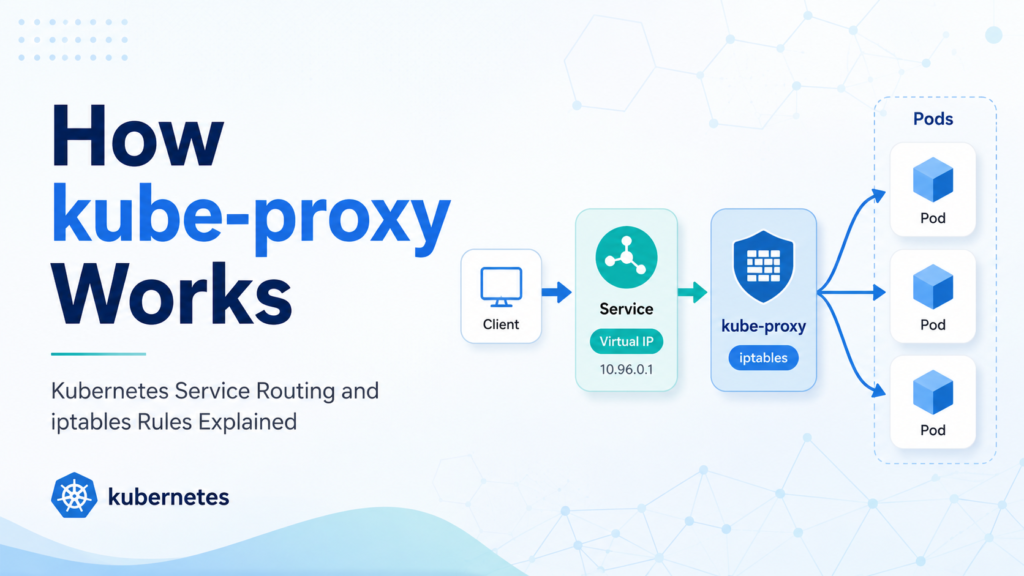

You create a Kubernetes Service, curl its ClusterIP, and somehow traffic reaches one of your Pods.
There is no process listening on the Service IP. The Service IP does not belong to a real network interface. You cannot usually ping it. Yet TCP connections work.
That little bit of Kubernetes networking feels like magic until you inspect the node and find hundreds—or thousands—of iptables rules created by kube-proxy.
If you have ever searched for kube-proxy iptables rules explained, this guide will walk you through the moving parts: Services, EndpointSlices, ClusterIP, NodePort, DNAT, SNAT, connection tracking, and the famous KUBE-SERVICES, KUBE-SVC-*, and KUBE-SEP-* chains.
By the end, Kubernetes Service routing should feel less like a black box and more like a predictable packet-rewrite system.
What kube-proxy Actually Does
Despite the name, kube-proxy is usually not proxying packets in userspace.
On most Linux clusters running iptables mode, kube-proxy watches the Kubernetes API for Service and EndpointSlice changes, then programs Linux netfilter rules so the kernel can route traffic.
A simplified view looks like this:
Kubernetes API
   ↓
Services + EndpointSlices
   ↓
kube-proxy on every node
   ↓
iptables NAT rules
   ↓
Packets rewritten to real Pod IPs
The important part is that kube-proxy runs on every node.
Each node must know how to handle Service traffic because a packet might originate from:
- A Pod on that node
- A process running on the node
- An external client hitting a NodePort
- A load balancer forwarding traffic to a node
The official Kubernetes documentation describes kube-proxy as the network proxy that runs on each node and reflects Services defined in the Kubernetes API.
In iptables mode, kube-proxy does not forward every packet itself. It writes rules, and the Linux kernel handles the packet path.
Service, EndpointSlice, and Pod: The Three Objects to Understand
A Kubernetes Service gives your application a stable virtual address.
For example:
apiVersion: v1
kind: Service
metadata:
  name: web
spec:
  type: ClusterIP
  selector:
    app: web
  ports:
    - port: 80
      targetPort: 8080
This Service may get a ClusterIP such as:
10.96.42.10
Your Pods may look like this:
10.244.1.12:8080
10.244.2.18:8080
10.244.3.21:8080
The Service IP is stable. The Pod IPs are not.
That is where EndpointSlices come in. Kubernetes uses EndpointSlices to track the backend endpoints for a Service. When Pods become ready, move, restart, or disappear, EndpointSlices change.
kube-proxy watches those changes and rewrites its local rules accordingly.
So the chain of responsibility is:
| Component | Role |
|---|---|
| Service | Stable virtual IP and port |
| Selector | Finds matching Pods |
| EndpointSlice | Stores ready backend Pod IPs and ports |
| kube-proxy | Watches Service and EndpointSlice changes |
| iptables | Rewrites packets to selected endpoints |
| conntrack | Keeps established connections consistent |
This is why a Service can continue working even when Pods are replaced. The virtual IP stays the same while the backend endpoints change.
kube-proxy Modes: iptables, nftables, IPVS, and Userspace
Historically, kube-proxy has supported multiple modes.
| Mode | Status and usage | How it works |
| userspace | Legacy | kube-proxy accepts and forwards traffic itself |
| iptables | Very common and still widely used | Programs netfilter iptables rules |
| IPVS | Deprecated in newer Kubernetes releases | Uses Linux IPVS plus iptables |
| nftables | Modern Linux replacement path | Uses nftables rules instead of iptables |
This article focuses on iptables mode because it remains common and is still the mode many administrators debug in real clusters.
However, newer Kubernetes releases have been moving toward nftables as the better long-term Linux backend. The Kubernetes project announced the nftables kube-proxy backend as stable in Kubernetes 1.33, while keeping iptables as the default for compatibility at that time. IPVS mode was later marked deprecated in Kubernetes 1.35.
So if you do not see KUBE-SERVICES rules on a modern node, do not immediately assume kube-proxy is broken. First check the proxy mode.
Run this on a node:
curl -s http://localhost:10249/proxyMode
Example output:
iptables
You can also check kube-proxy logs:
kubectl -n kube-system logs -l k8s-app=kube-proxy
Look for lines indicating whether it is using the iptables, nftables, or another proxier.
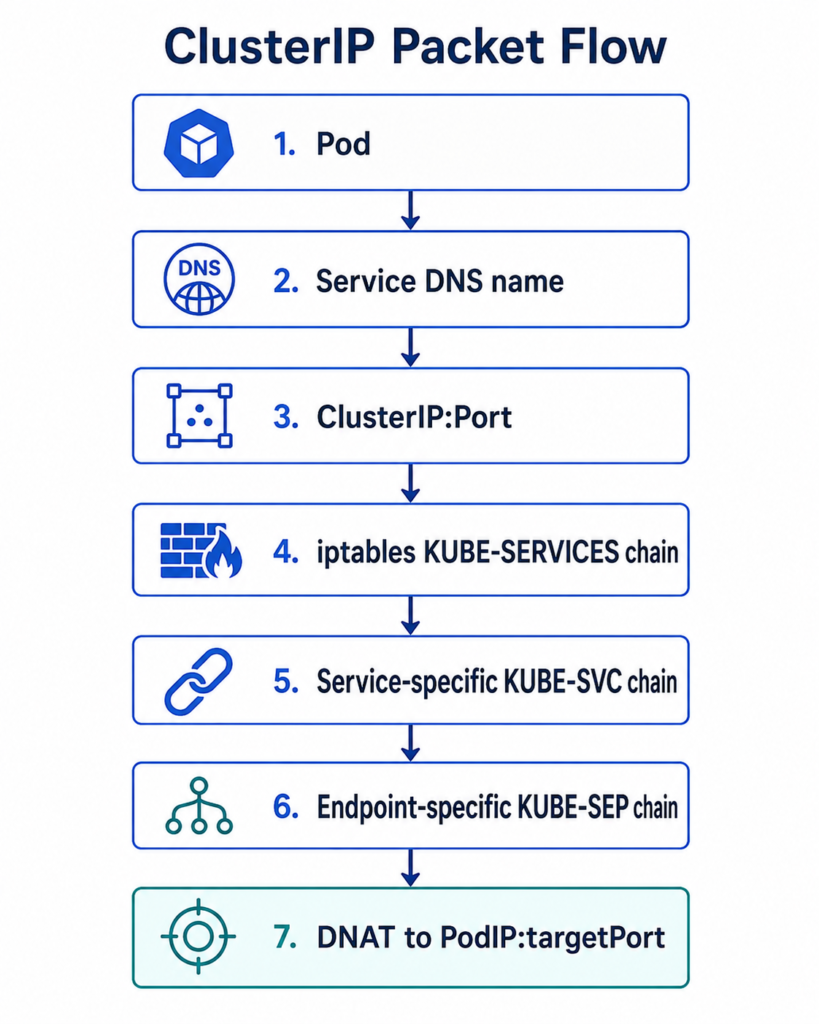
A Simple Packet Flow for ClusterIP
Assume a Pod sends traffic to:
web.default.svc.cluster.local:80
Cluster DNS resolves that name to the Service ClusterIP:
10.96.42.10
The Pod sends a packet:
Source:      10.244.1.50:53000
Destination: 10.96.42.10:80
On the node, iptables NAT rules intercept the packet and rewrite the destination to one real backend Pod:
Source:      10.244.1.50:53000
Destination: 10.244.2.18:8080
That destination rewrite is called DNAT: destination network address translation.
The backend Pod receives the packet as though the client connected directly to it.
A simplified path looks like this:
The Main kube-proxy iptables Chains
On a node running kube-proxy in iptables mode, inspect NAT rules with:
sudo iptables-save -t nat | grep KUBE
You may see chains like:
KUBE-SERVICES
KUBE-SVC-XXXXXXXXXXXXXXX
KUBE-SEP-YYYYYYYYYYYYYYY
KUBE-NODEPORTS
KUBE-MARK-MASQ
KUBE-POSTROUTING
The names are implementation details and can vary across Kubernetes versions, but the pattern is useful for learning and troubleshooting.
KUBE-SERVICES
This is the main entry chain for Service traffic.
It contains rules that match Service IPs, ports, protocols, load balancer IPs, external IPs, and NodePorts.
A simplified rule might mean:
If destination is 10.96.42.10 TCP port 80,
jump to the chain for the web Service.
KUBE-SVC-*
This is a Service-specific chain.
It represents one Service port and chooses among available endpoints.
For a Service with three ready Pods, the KUBE-SVC-* chain contains rules that probabilistically distribute new connections across endpoint chains.
KUBE-SEP-*
This is an endpoint-specific chain.
It represents a single backend endpoint such as:
10.244.2.18:8080
The endpoint chain performs the final DNAT to the Pod IP and target port.
KUBE-NODEPORTS
This chain handles NodePort traffic.
If a Service exposes a NodePort such as 31080, traffic arriving at:
<NodeIP>:31080
can be redirected to the Service’s backend endpoints.
KUBE-MARK-MASQ and KUBE-POSTROUTING
These chains help with masquerading, which is Kubernetes’ use of SNAT in cases where the return path needs to go back through the same node.
SNAT changes the source address of a packet, often to the node IP.
This matters for NodePort, LoadBalancer, hairpin traffic, and traffic crossing certain network boundaries.
Example: Reading kube-proxy iptables Rules
Imagine this Service:
kubectl create deployment web --image=nginx --replicas=3
kubectl expose deployment web --port=80 --target-port=80
Check the Service:
kubectl get svc web
Example:
NAME   TYPE        CLUSTER-IP     PORT(S)
web    ClusterIP   10.96.42.10    80/TCP
Check endpoints:
kubectl get endpointslices -l kubernetes.io/service-name=web
Or:
kubectl get endpoints web
Now inspect the node:
sudo iptables-save -t nat | grep 10.96.42.10
You might see a rule conceptually like:
-A KUBE-SERVICES -d 10.96.42.10/32 \
  -p tcp -m tcp --dport 80 \
  -j KUBE-SVC-ABC123
That means:
Traffic going to Service IP
10.96.42.10on TCP port80should jump to the Service chain.
Now inspect the Service chain:
sudo iptables-save -t nat | grep KUBE-SVC-ABC123
You may see rules using the statistic module:
-A KUBE-SVC-ABC123 -m statistic --mode random --probability 0.33333333349 -j KUBE-SEP-111
-A KUBE-SVC-ABC123 -m statistic --mode random --probability 0.50000000000 -j KUBE-SEP-222
-A KUBE-SVC-ABC123 -j KUBE-SEP-333
This is kube-proxy’s iptables-style load distribution.
Finally, inspect an endpoint chain:
sudo iptables-save -t nat | grep KUBE-SEP-111
Conceptually:
-A KUBE-SEP-111 -p tcp -m tcp -j DNAT --to-destination 10.244.1.12:80
That is the final rewrite.
Your application connected to 10.96.42.10:80, but the kernel sent the packet to 10.244.1.12:80.
Why Services Are Connection-Based, Not Request-Based
A common misconception is that kube-proxy load balances every HTTP request.
In iptables mode, kube-proxy works at the packet and connection level, not at the HTTP request level.
For a TCP connection, the endpoint is selected when the connection is established. Linux connection tracking remembers that decision, so packets belonging to the same connection continue to go to the same backend.
That means:
- One long-lived TCP connection stays on one backend.
- HTTP keep-alive can send many requests to the same Pod.
- gRPC connections may remain pinned to one backend for a long time.
- kube-proxy does not inspect URLs, headers, cookies, or HTTP methods.
If you need request-aware routing, use an Ingress controller, Gateway API implementation, service mesh, or application-level load balancing.
kube-proxy gives you network-level Service routing. It is not an L7 proxy.
ClusterIP, NodePort, and LoadBalancer Compared
The Service type affects how traffic enters the kube-proxy rules.
| Service type | Traffic entry point | What kube-proxy handles |
| ClusterIP | Service IP inside cluster | DNAT from ClusterIP to Pod IP |
| NodePort | Node IP plus static port | NodePort match, then DNAT to backend |
| LoadBalancer | External load balancer to node | Usually reaches NodePort or node-level path |
| ExternalName | DNS CNAME | No kube-proxy data-plane rules for ClusterIP |
For ClusterIP, traffic usually starts inside the cluster.
For NodePort, traffic arrives at a node:
<NodeIP>:<NodePort>
The packet may enter through the PREROUTING path, jump into Kubernetes chains, and get DNATed to a backend Pod.
For LoadBalancer, the cloud provider or external load balancer usually forwards traffic to nodes. kube-proxy still commonly handles the final hop to Pods unless your platform uses another data plane.
What Happens to Source IP?
Source IP behavior is one of the most important kube-proxy topics in production troubleshooting.
For normal ClusterIP traffic inside the cluster, kube-proxy in iptables mode generally does not source-NAT the packet. The backend Pod can often see the client Pod IP.
For NodePort and LoadBalancer traffic, source IP may be replaced with the node IP depending on the Service configuration and traffic path.
By default, with externalTrafficPolicy: Cluster, traffic can be forwarded from a node with no local endpoint to a Pod on another node. In that case, Kubernetes may use SNAT so the reply returns through the original node.
Example:
External client
   ↓
Node 2 NodePort
   ↓
SNAT to Node 2 IP
   ↓
Pod on Node 1
The backend Pod sees the source as the node, not the original client.
To preserve client source IP, set:
spec:
  externalTrafficPolicy: Local
With Local, kube-proxy only sends external traffic to local endpoints on that node. If there is no local endpoint, the traffic is dropped rather than forwarded elsewhere.
That preserves source IP but changes availability behavior. Your load balancer must send traffic only to nodes with ready local endpoints, or health checks must ensure traffic avoids nodes without endpoints.
The Role of conntrack
iptables NAT relies heavily on connection tracking.
When the first packet of a connection is DNATed from Service IP to Pod IP, conntrack records the mapping.
Future packets in the same connection follow the same mapping.
This is why established connections can continue briefly even after endpoints change. kube-proxy may update the rules, but conntrack entries for existing flows can still exist.
This can surprise you during rollouts:
- New connections use the updated endpoint set.
- Existing connections may continue to an old Pod until they close or timeout.
- Long-lived connections may hide Service-routing changes.
You can inspect conntrack entries on a node with:
sudo conntrack -L | grep 10.96.42.10
Be careful deleting conntrack entries in production. It can break active connections.
How kube-proxy Updates Rules
kube-proxy watches the Kubernetes API for:
- Services
- EndpointSlices
- Node information
- Configuration changes relevant to Services
When a Service or EndpointSlice changes, kube-proxy recalculates the desired rules and applies them to the node.
This is why Service routing is eventually consistent.
If a Pod becomes ready, Kubernetes updates EndpointSlices. kube-proxy sees the change and updates the local data plane. The update is usually fast, but not instant.
In large clusters, rule-update performance matters. One reason EndpointSlices replaced the older Endpoints API is scalability: Services with many backends can be represented and updated more efficiently.
The older Endpoints API is deprecated in newer Kubernetes versions and has limitations such as truncation when too many endpoints are stored in one object.
Why kube-proxy Rules Can Be Hard to Read
A real node may contain thousands of generated rules.
That happens because kube-proxy needs to account for:
- Every Service
- Every Service port
- Every endpoint
- NodePorts
- LoadBalancer ingress rules
- External IPs
- Session affinity
- Masquerade decisions
- Health-check ports
- Dual-stack IPv4 and IPv6 behavior
Do not try to memorize every generated rule name. Instead, follow the packet.
A good mental model is:
Where does the packet enter?
What Service IP or NodePort does it match?
Which KUBE-SVC chain handles that Service?
Which KUBE-SEP chain represents the chosen endpoint?
Was DNAT applied?
Was SNAT needed?
Did conntrack preserve the flow?
That process is more reliable than staring at the entire ruleset.
Troubleshooting kube-proxy iptables Service Routing
When a Service fails, start at the Kubernetes layer before diving into iptables.
1. Check the Service
kubectl get svc web -o wide
kubectl describe svc web
Confirm:
- Correct Service type
- Correct ClusterIP
- Correct port
- Correct targetPort
- Correct selector
A wrong selector is one of the most common causes of Service failure.
2. Check EndpointSlices
kubectl get endpointslices \
  -l kubernetes.io/service-name=web \
  -o wide
If there are no endpoints, kube-proxy has nothing useful to route to.
Check Pod labels:
kubectl get pods --show-labels
Check readiness:
kubectl get pods -o wide
A Pod that is running but not ready should not normally receive Service traffic.
3. Test ClusterIP from inside the cluster
Run a temporary debug Pod:
kubectl run tmp-shell \
  --rm -it \
  --image=busybox:1.36 \
  -- sh
Inside it:
wget -qO- http://web.default.svc.cluster.local
Also test the ClusterIP directly:
wget -qO- http://10.96.42.10
If DNS fails but ClusterIP works, investigate CoreDNS.
If ClusterIP fails too, continue to kube-proxy and endpoints.
4. Check kube-proxy mode and logs
On a node:
curl -s http://localhost:10249/proxyMode
Then:
kubectl -n kube-system logs -l k8s-app=kube-proxy --tail=100
Look for errors related to:
- iptables restore failures
- missing kernel modules
- permission issues
- API watch failures
- invalid configuration
- node IP detection
5. Inspect iptables rules
On the relevant node:
sudo iptables-save -t nat | grep KUBE-SERVICES
Search for the Service IP:
sudo iptables-save -t nat | grep 10.96.42.10
If no rule exists for the Service, kube-proxy may not be watching correctly, may be in another proxy mode, or may have failed to program rules.
6. Capture packets
Use tcpdump to see whether traffic reaches the node and where it goes:
sudo tcpdump -ni any host 10.96.42.10
For backend Pod traffic:
sudo tcpdump -ni any host 10.244.1.12
Packet capture often separates “Kubernetes object is wrong” from “node dataplane is wrong.”
Common kube-proxy iptables Problems
Service has no endpoints
The Service exists, but no ready Pods match its selector.
Fix labels, selectors, or readiness probes.
targetPort is wrong
The Service sends traffic to a port where the container is not listening.
Check:
kubectl describe pod <pod-name>
kubectl get svc web -o yaml
kube-proxy is not running on a node
A node without working kube-proxy may fail Service routing.
Check:
kubectl -n kube-system get pods -l k8s-app=kube-proxy -o wide
Host firewall conflicts with Kubernetes chains
Manual firewall rules can interfere with Kubernetes traffic.
This is especially common when administrators modify iptables or nftables rules without understanding how the CNI plugin and kube-proxy interact.
Hairpin traffic fails
A Pod accessing its own Service IP may require hairpin mode support depending on the CNI and bridge setup.
Kubernetes documentation specifically calls out hairpin traffic as an edge case with iptables mode and bridge networking.
Long-lived connections still hit old Pods
conntrack may preserve existing flows even after EndpointSlices update.
This is expected for established connections.
iptables Mode vs nftables Mode: Should You Still Learn iptables?
Yes.
Even though nftables is the modern direction, iptables knowledge remains useful because:
- Many clusters still use iptables mode.
- Older troubleshooting guides reference iptables chains.
- CNI plugins may still interact with iptables.
- Node firewalls may use iptables compatibility layers.
- The packet-flow concepts transfer to nftables.
That said, avoid assuming all clusters use iptables.
Always check the proxy mode before troubleshooting generated rules.
curl -s http://localhost:10249/proxyMode
If it returns:
nftables
then you need to inspect nftables instead of iptables:
sudo nft list ruleset
The idea is the same—Service traffic is matched and rewritten—but the rule syntax and implementation differ.
Conclusion
kube-proxy is one of those Kubernetes components that quietly works until it does not. When Service traffic fails, understanding the iptables path can save hours of guesswork.
In iptables mode, kube-proxy watches Services and EndpointSlices, then creates Linux NAT rules on every node. Those rules match ClusterIPs, NodePorts, and Service ports, choose backend endpoints, and DNAT packets to real Pod IPs.
The simplified packet journey is:
Client → Service IP → KUBE-SERVICES → KUBE-SVC → KUBE-SEP → Pod IP
Once you understand that flow, Kubernetes Services become easier to debug.
Check the Service. Check EndpointSlices. Confirm kube-proxy mode. Inspect generated rules only after confirming the Kubernetes objects are correct. Then use packet capture when the rules look right but traffic still disappears.
That is the practical way to move from “Kubernetes networking magic” to predictable Linux packet routing.
Have you debugged a Service issue by inspecting kube-proxy rules, conntrack, or tcpdump output? Share the command that helped you find the problem in the comments.
For more practical Kubernetes, Linux, Docker, and DevOps troubleshooting guides, subscribe to Codefy and explore the related tutorials.