
You rotate a database password, update the Kubernetes Secret, and verify that the new value exists in the API.
Then you enter the running container and find the old password still sitting in the mounted file.
The deployment looks healthy. Kubernetes reports no errors. The volume is mounted correctly. Yet the application continues using stale credentials.
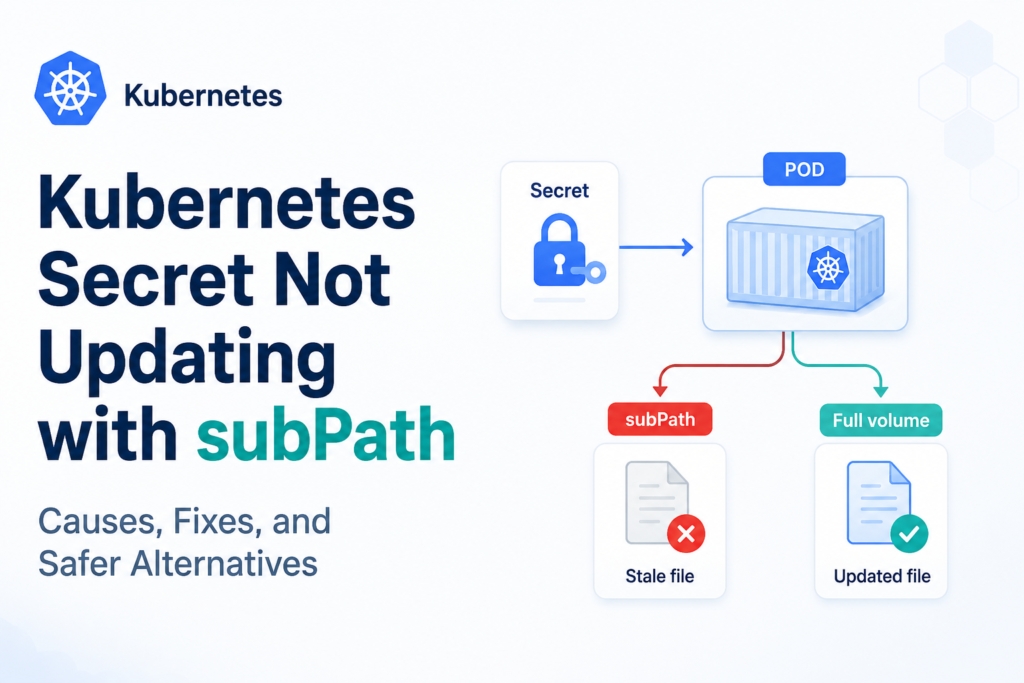
This is one of the most confusing Kubernetes configuration problems because nothing is technically broken. A Kubernetes secret volume not updating with subPath is expected behavior—not a temporary synchronization delay or a kubelet bug.
The important detail is how Kubernetes updates Secret-backed volumes and what changes when subPath is used.
This guide explains the underlying mechanism, shows reliable fixes, and compares safer alternatives for workloads that need automatic secret rotation.
The Problem: Secret Changes but the Mounted File Does Not
Consider a Secret containing a database password:
apiVersion: v1
kind: Secret
metadata:
  name: database-credentials
type: Opaque
stringData:
  password: initial-password
A Deployment might mount only the password key into an existing application directory:
apiVersion: apps/v1
kind: Deployment
metadata:
  name: payment-api
spec:
  replicas: 1
  selector:
    matchLabels:
      app: payment-api
  template:
    metadata:
      labels:
        app: payment-api
    spec:
      containers:
        - name: payment-api
          image: example/payment-api:1.0
          volumeMounts:
            - name: database-credentials
              mountPath: /app/config/database-password
              subPath: password
              readOnly: true
      volumes:
        - name: database-credentials
          secret:
            secretName: database-credentials
The subPath setting tells Kubernetes to mount one item from the volume instead of mounting the complete Secret directory.
Initially, everything works:
kubectl exec deploy/payment-api -- \
  cat /app/config/database-password
Output:
initial-password
Now update the Secret:
kubectl create secret generic database-credentials \
  --from-literal=password=rotated-password \
  --dry-run=client \
  -o yaml | kubectl apply -f -
The API now contains the new password. However, the file inside the existing container still contains:
initial-password
Waiting several minutes will not solve it.
The official Kubernetes Secret documentation explicitly states that a container using a Secret through a subPath volume mount does not receive automated Secret updates.
Why Kubernetes Secret Volumes Normally Update
To understand the failure, first look at what happens without subPath.
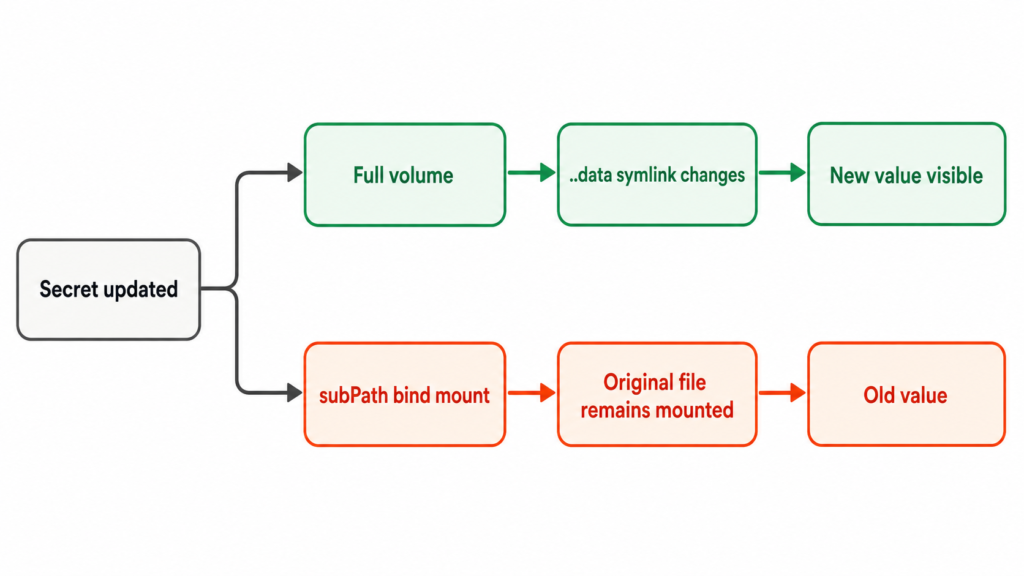
When a complete Secret is mounted as a directory, Kubernetes does not simply write static files into the container. The kubelet maintains a node-local representation of the Secret and periodically reconciles the mounted volume.
A simplified directory structure resembles this:
/etc/app-secrets/
├── ..data -> ..2026_06_06_10_15_30
├── ..2026_06_06_10_15_30/
│   ├── username
│   └── password
├── username -> ..data/username
└── password -> ..data/password
When the Secret changes, Kubernetes can:
- Create a new timestamped data directory.
- Write the updated Secret values into it.
- Atomically redirect the
..datasymbolic link. - Allow applications reading through the normal file path to see the new content.
This atomic replacement avoids exposing partially written Secret data.
Secret-volume propagation is eventually consistent rather than instantaneous. The kubelet detects changes according to its configured change-detection strategy, which defaults to watching for updates. There may still be a short delay caused by synchronization and cache behavior.
That delay is different from the subPath problem.
A normal Secret directory should eventually update. A file mounted through subPath will remain pinned to the original mounted object for the lifetime of that Pod.
Why subPath Breaks Automatic Secret Updates
A subPath mount is effectively a bind mount of a specific file or directory into another location in the container.
At container startup, Kubernetes resolves the selected path—such as password—and mounts that exact object at the requested destination:
Secret volume file
        ↓
Resolved during Pod setup
        ↓
Bind-mounted at /app/config/database-password
Later, Kubernetes refreshes the underlying Secret volume by switching its symlink structure to a newly written data directory.
The full Secret volume follows the new target. The existing subPath bind mount does not. It remains connected to the file that was resolved when the container was created.
A useful way to think about this is:
A regular Secret volume follows Kubernetes’ moving pointer. A subPath mount captures the target that the pointer referenced at startup.
This behavior has been discussed in the Kubernetes project since at least 2017. The long-running Kubernetes issue about ConfigMaps and Secrets mounted with subPath documents the same limitation.
It also affects ConfigMaps and other dynamically projected volume sources. For example, the Kubernetes documentation gives the same warning for Downward API files mounted with subPath.
Normal Secret Volume vs subPath Mount
| Behavior | Full Secret directory | Secret file with subPath |
|---|---|---|
| Initial value is mounted | Yes | Yes |
| Existing application directory is preserved | No, mount hides that directory | Yes |
| Secret changes reach the mounted path | Eventually | No |
| Pod restart required after rotation | Usually not for the file itself | Yes |
| Application may still need reload logic | Yes | Yes |
| Recommended for live secret rotation | Yes, with application support | No |
The most important distinction is that updating the file and reloading the application are separate problems.
Even with a normal Secret volume, Kubernetes can update the file without forcing the application to reread it. An application that loads credentials only during startup may continue using the old value until it is restarted or explicitly reloaded.
How to Confirm That subPath Is the Cause
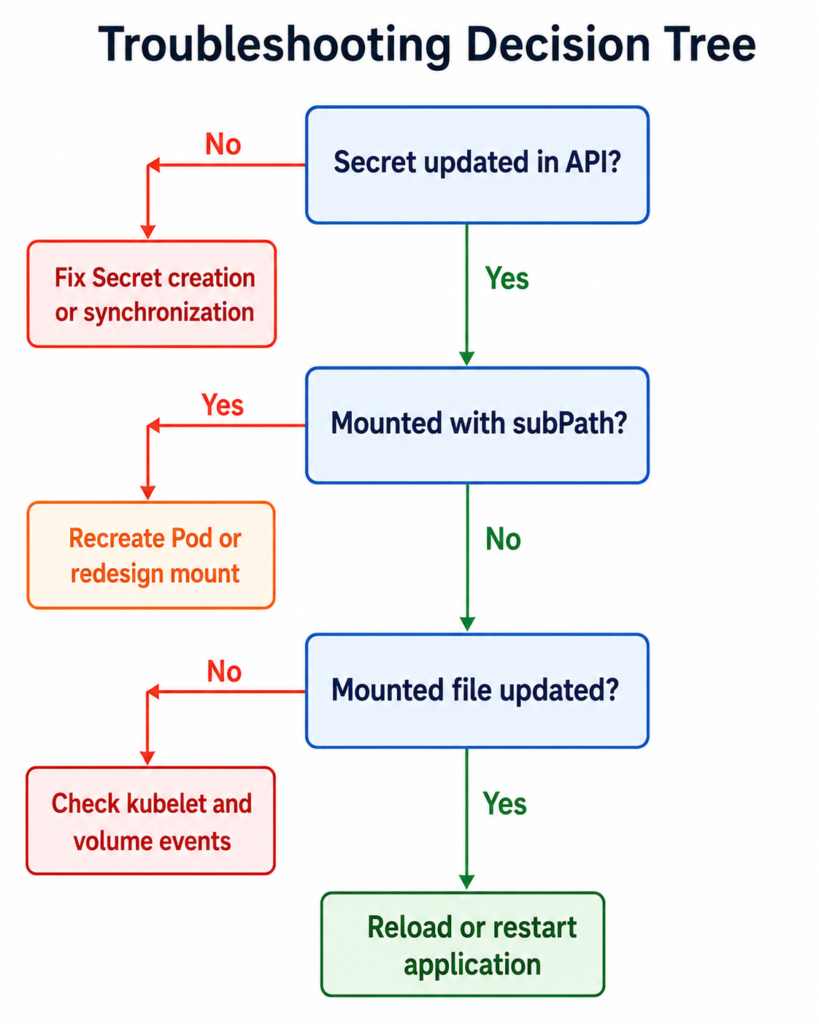
Before changing the workload, confirm that the Kubernetes Secret itself was updated correctly.
1. Inspect the Secret value
kubectl get secret database-credentials \
  -o jsonpath='{.data.password}' | base64 --decode
If this prints the new value, the API object is correct.
Avoid printing production secrets into terminal history or CI logs. A safer validation is to compare hashes:
kubectl get secret database-credentials \
  -o jsonpath='{.data.password}' |
  base64 --decode |
  sha256sum
Then compare it with the mounted file:
kubectl exec deploy/payment-api -- \
  sha256sum /app/config/database-password
2. Inspect the Pod specification
kubectl get pod <pod-name> -o yaml
Look for a mount similar to:
volumeMounts:
  - mountPath: /app/config/database-password
    name: database-credentials
    subPath: password
If subPath is present, waiting for kubelet synchronization will not update that mount.
3. Check whether the application cached the value
If the file inside the container contains the new secret but the application still fails authentication, the volume update is working. The application is probably caching the old credentials.
That requires an application reload, connection-pool reset, or Pod restart—not a volume-mount fix.
Fix 1: Restart the Pods After Updating the Secret
The quickest operational fix is to recreate the Pods:
kubectl rollout restart deployment/payment-api
A new Pod resolves the subPath against the latest Secret data, so the mounted file contains the updated value.
Verify the rollout:
kubectl rollout status deployment/payment-api
When this approach is appropriate
A controlled restart is often reasonable when:
- Secrets rotate infrequently.
- The workload has multiple replicas.
- Readiness probes prevent traffic from reaching unready Pods.
- The Deployment uses a safe rolling-update strategy.
- Your secret-management pipeline can trigger the restart automatically.
Limitations
A manual restart is easy to forget. It also introduces operational coupling: rotating a secret now requires changing the Secret and restarting every workload that consumes it through subPath.
For a few workloads, that may be acceptable. At larger scale, it becomes a reliability risk.
Fix 2: Mount the Entire Secret Directory
The most direct way to retain native update behavior is to remove subPath and mount the Secret as a directory:
volumeMounts:
  - name: database-credentials
    mountPath: /var/run/secrets/database
    readOnly: true
The application can then read:
/var/run/secrets/database/password
This allows Kubernetes to update the Secret volume using its normal atomic mechanism.
The directory-shadowing problem
Mounting a volume over a directory hides files that were originally present at that location in the container image.
For example, mounting a Secret at /app/config hides all image-provided files beneath /app/config.
That is one of the main reasons engineers reach for subPath in the first place.
The safer design is to use a dedicated mount directory:
/app/config/                  # application configuration
/var/run/secrets/database/   # Kubernetes-managed secret files
This separation is clearer, easier to troubleshoot, and compatible with automatic volume updates.
Fix 3: Use an Init Container and emptyDir
Some legacy applications require a secret file at a fixed path alongside ordinary configuration files.
In that case, use:
- A Secret mounted as a directory.
- An
emptyDirworking directory. - An init container that copies initial configuration into
emptyDir. - The application container mounting
emptyDirat its expected path.
A simplified pattern looks like this:
spec:
  volumes:
    - name: source-secret
      secret:
        secretName: database-credentials

    - name: app-config
      emptyDir: {}

  initContainers:
    - name: prepare-config
      image: busybox:1.36
      command:
        - sh
        - -c
        - |
          cp /source/password /work/database-password
          chmod 0400 /work/database-password
      volumeMounts:
        - name: source-secret
          mountPath: /source
          readOnly: true
        - name: app-config
          mountPath: /work

  containers:
    - name: payment-api
      image: example/payment-api:1.0
      volumeMounts:
        - name: app-config
          mountPath: /app/config
This solves the directory-layout problem, but it does not provide live rotation by itself. Init containers run only before the application starts.
After a Secret change, you must still restart the Pod unless another process keeps the copied file synchronized.
Fix 4: Add a Sidecar That Synchronizes and Reloads
For applications that cannot read from the native Secret mount location, a sidecar can watch the source directory and copy updates into a shared emptyDir.
The sidecar may also:
- Validate the new file.
- Replace it atomically.
- Send
SIGHUPto the application. - Call an application reload endpoint.
- Record rotation success metrics.
This pattern can work, but it transfers responsibility from Kubernetes to your own synchronization logic.
You must carefully handle:
- Atomic writes.
- File permissions.
- Partially written values.
- Sidecar crashes.
- Application reload failures.
- Secret-file logging.
- Multi-file consistency.
A sidecar is appropriate when the application has strict path requirements and cannot be modified. It should not be the default solution when mounting the complete Secret directory is possible.
Fix 5: Trigger Declarative Rollouts with Secret Checksums
Helm users commonly add a Secret checksum to the Pod template:
spec:
  template:
    metadata:
      annotations:
        checksum/database-secret: {{ include (print $.Template.BasePath "/secret.yaml") . | sha256sum }}
When the rendered Secret changes, the annotation changes. Because the Pod template is different, Kubernetes creates a new ReplicaSet and rolls out new Pods.
This approach is useful when the Secret is deployed as part of the same Helm release.
However, it does not automatically help when an external system modifies the Secret independently. In that case, consider a controller that watches Secret changes and triggers workload rollouts.
The key improvement is making the restart part of the rotation workflow rather than relying on an operator to remember it.
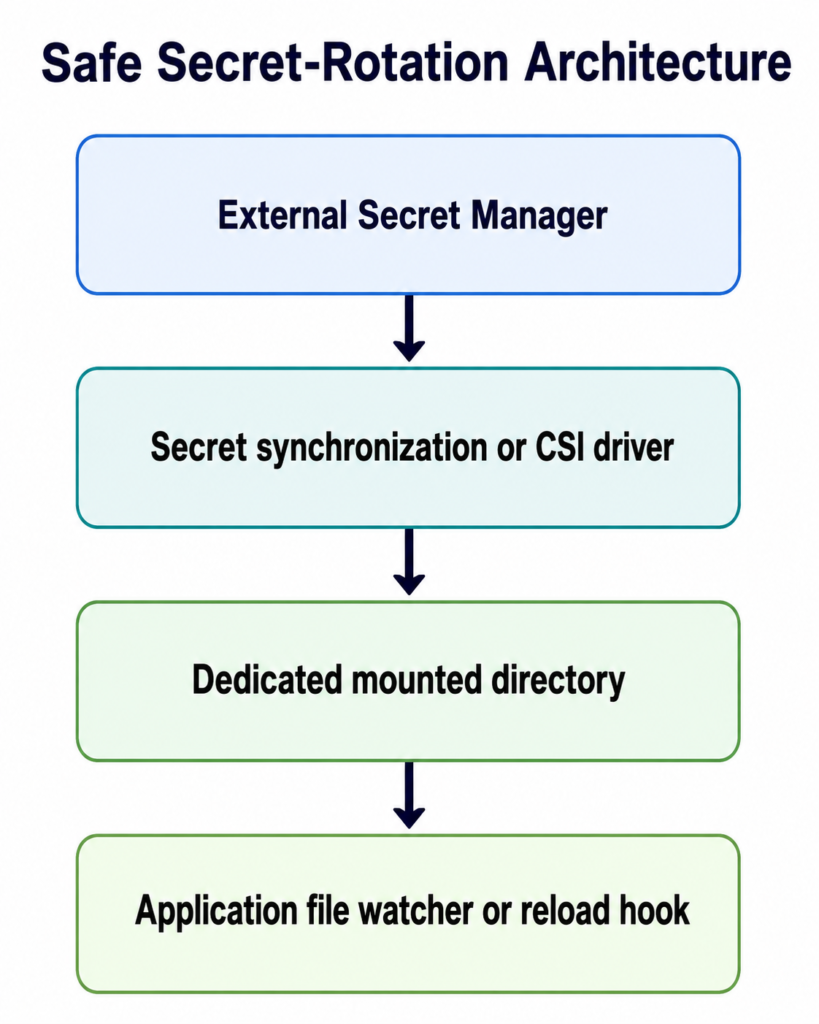
Safer Alternatives for Production Secret Rotation
Secrets Store CSI Driver
The Secrets Store CSI Driver can mount secrets from external systems such as cloud secret managers or Vault-compatible providers.
Kubernetes also lists the driver in its Secret security guidance as a way to retrieve data from external stores and mount it into Pods.
Depending on the provider and configuration, the driver can support automatic rotation of mounted content. Your application still needs to reread the updated file, and using another subPath mount can reintroduce the same stale-file design problem.
Mount the CSI-managed directory directly whenever possible.
External Secrets Operator
External Secrets Operator synchronizes values from external providers into native Kubernetes Secret objects.
This is useful for centralizing secret ownership, but it does not change Kubernetes volume semantics:
- Full Secret directory mounts can update.
- Environment variables require Pod recreation.
subPathSecret mounts remain stale until Pod recreation.
External synchronization and in-container delivery are separate layers. Solving the first does not automatically solve the second.
Application-level secret retrieval
Some applications fetch credentials directly from a secret manager using workload identity.
This can offer:
- Short-lived credentials.
- Fine-grained authorization.
- On-demand rotation.
- Less secret material stored in Kubernetes.
It also adds SDK dependencies, retry logic, caching decisions, and external-service availability concerns.
For applications designed for cloud-native credential rotation, direct retrieval may be the strongest long-term model. For simpler workloads, a mounted Secret directory plus reload support is often easier to operate.
Comparing the Available Approaches
| Approach | Receives rotated value | Requires Pod restart | Complexity | Best use case |
Secret with subPath | No | Yes | Low | Static or rarely changed values |
| Full Secret directory | Yes | Maybe, depending on app | Low | File-based secrets with reload support |
| Secret as environment variable | No | Yes | Low | Values read only at startup |
Init container plus emptyDir | No, unless restarted | Yes | Medium | Legacy file layout |
| Synchronization sidecar | Yes | Usually no | High | Fixed-path legacy applications |
| CSI driver with rotation | Often yes | Depends on app | Medium | External secret stores |
| Application fetches secret directly | Application-controlled | Usually no | High | Dynamic or short-lived credentials |
Common Misdiagnoses
“The kubelet cache has not refreshed yet”
That can explain a short delay for a normal Secret volume. It does not explain a permanently stale subPath mount.
Changing the kubelet synchronization interval will not make subPath updates work.
“The Secret update failed”
Always verify the API object, but if the Secret contains the new value and the Pod uses subPath, the stale file is expected.
“Restarting the container should be enough”
A restart performed only inside the existing Pod may not reconstruct the volume mount as expected. Recreate the Pod through its controller:
kubectl rollout restart deployment/payment-api
“Environment variables will solve live rotation”
Secret-backed environment variables are resolved when the container starts. Updating the Secret does not modify the environment of a running process.
Environment variables simplify consumption but still require Pod recreation after rotation.
Recommended Production Pattern
For most workloads, use this design:
- Mount the complete Secret into a dedicated directory such as
/var/run/secrets/<service>. - Configure the application to read credentials from that path.
- Make the application reload the file safely when it changes.
- Keep a rolling restart mechanism available for applications that only read secrets at startup.
- Automate restarts as part of the secret-rotation workflow.
- Avoid using
subPathfor values that must rotate without Pod recreation. - Restrict Secret access through RBAC and enable encryption at rest where appropriate.
Final Thoughts
When a Kubernetes Secret changes but a subPath-mounted file remains stale, Kubernetes is behaving as designed.
The problem is not usually cache delay, YAML formatting, or a failed Secret update. The subPath mount was bound to a particular file when the Pod started, and later volume updates do not replace that mount.
A Pod restart is the quickest fix. Mounting the full Secret directory is generally the cleaner design. For more advanced rotation requirements, consider a CSI driver, a controlled rollout mechanism, or application-level secret retrieval.
Most importantly, treat secret rotation as an end-to-end process. Updating the source value is only the first step. The new credential must reach the filesystem, be detected by the application, and take effect without leaving the workload in a partially rotated state.
Have you encountered a Kubernetes secret that stayed stale even after rotation? Share the mount pattern and application behavior in the comments. You may also want to read Why Kubernetes Pods Still Use Old Secret Values and How to Refresh Them. For more practical Kubernetes, Linux, DevOps, and SRE troubleshooting guides, subscribe to Codefy and explore our related tutorials.